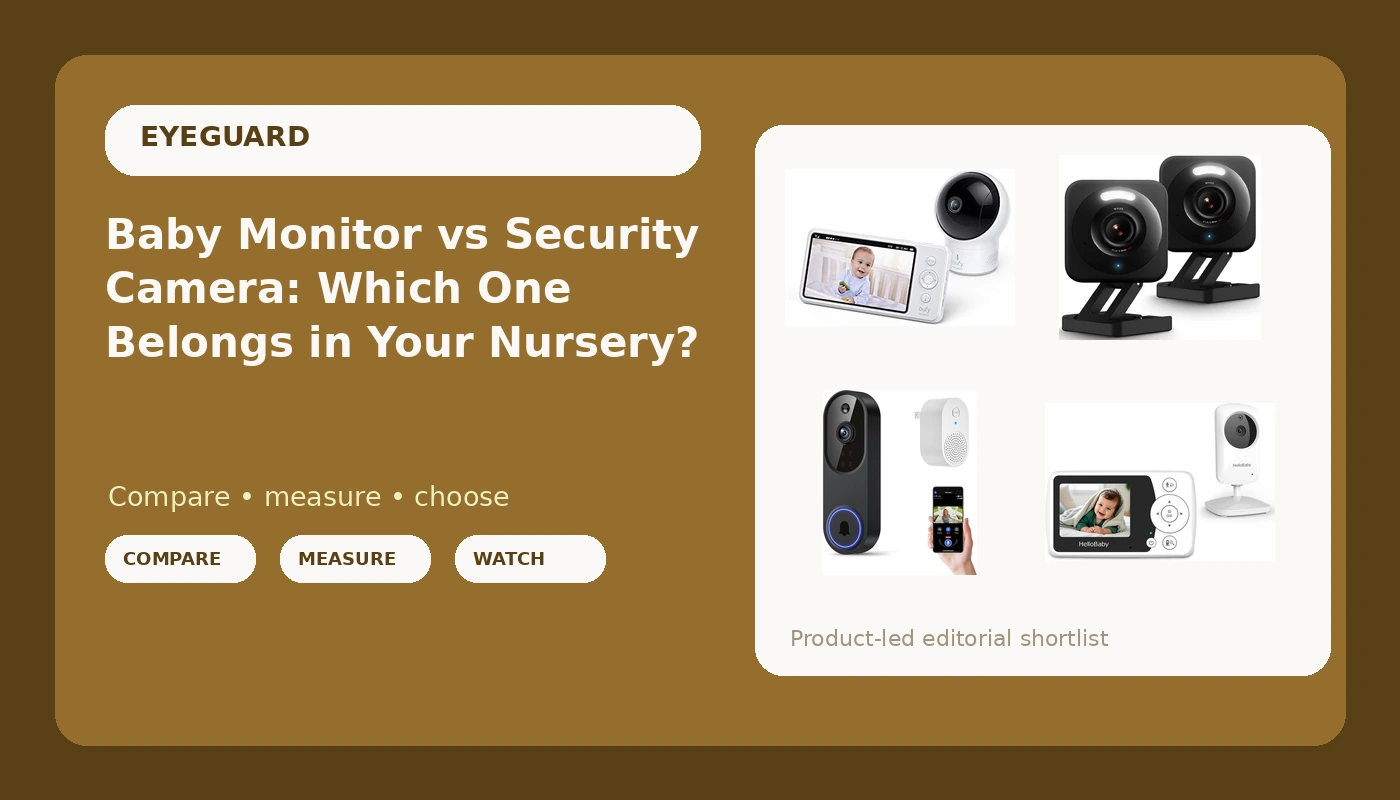
Search for a video baby monitor and you will find two different products sharing one label. One is a dedicated monitor: its own screen, its own direct link to the camera, no account, no phone. The other is a Wi-Fi security camera that the listing also pitches for nurseries, pets, and porches, because the hardware is close enough and the marketing is cheap. Both will show you a room. The difference shows up at 2 AM, when your internet drops, and in what happens to the footage afterward. This explainer walks through four cameras that cover both jobs, says plainly what each one is for, and gives you a way to choose without buying twice.
Related: Why Night Vision Claims Fall Apart Past 20 Feet →
Quick answer
If the job is watching a sleeping child and you want the least possible friction, a dedicated video baby monitor is the simpler answer: a camera paired with its own screen over a direct link, so there is no app to open, no home network in the middle, and no subscription standing between you and a live picture. If the job is watching property, a Wi-Fi security camera is the right tool, because it records, alerts, and lets you look in from anywhere. A doorbell camera is a third job again: it watches the one approach point every visitor uses. Households that need more than one of those jobs usually end up with two devices rather than one compromise.
Four useful options
| Model | Best fit | What stands out |
|---|---|---|
| WYZE Cam v4 (Latest Model), 2.5K AI Security Camera (2 Pack) | Indoor and outdoor coverage on a budget | 2.5K sensor, color night vision, AI-assisted detection, listing states no subscription required, two cameras in the box |
| eufy Security SpaceView Pro Video Baby Monitor | A nursery with a dedicated screen and no app | 5-inch screen, pan and tilt, two-way audio, night vision, lullaby player, no app required; renewed unit, wide angle lens not included |
| HelloBaby 2.4" Video Baby Monitor with Camera and Audio | The simplest possible nursery setup | A camera and its own 2.4-inch display in one package, with nothing to install on a phone |
| Orbitell 1080p Wireless Wi-Fi Video Doorbell Camera | The front door | 1080p video, two-way audio, night vision, cloud storage, smart AI motion detection, 2.4GHz Wi-Fi only |
The whole-home pick: WYZE Cam v4 (2 Pack)
The trade-off is the same one that applies to every Wi-Fi camera here: it is app-first. Live view and notifications route through your phone and your home network, so at 2 AM you are unlocking a screen, not glancing at a monitor on the nightstand. That is fine for a driveway or a side door and less pleasant for a nursery. The second thing to know is that a camera marketed for everything requires you to configure it for something. Detection zones are not a default you should trust out of the box; a camera pointed at a sidewalk will tell you about every car and every raccoon, and the standard response is to mute it, at which point it stops being security. Set the zones deliberately, then decide whether the alerts are worth keeping on.
The dedicated nursery monitor: eufy Security SpaceView Pro
Two caveats are worth stating plainly, because both are visible in the product name. First, renewed means you are buying a refurbished unit, so read the seller's condition terms before you commit and confirm what the return window covers. Second, no app is a feature and a limit at the same time: the screen has to be in the house with you, so there is no checking the crib from the office or from a hotel. The resolution is 720p rather than the 2.5K of the WYZE, and for a nursery that is usually an acceptable trade, because the thing you need at 3 AM is a fast, reliable picture of a small space, not a detailed image of a large one. Pan and tilt earn their keep here: a fixed camera pointed at a crib loses the room the moment a child learns to move.
The simplest nursery option: HelloBaby 2.4" Video Baby Monitor
The honest trade-off is the screen. A 2.4-inch display is enough to confirm that a child is asleep, to catch movement, and to hear the room clearly, and it is not a display you will want to study for detail. That makes this the audio-first, glance-second kind of monitor, which is exactly what a lot of parents actually want. It is also the easiest of the four to hand to a grandparent, to pack for a trip, or to set up in a second bedroom, because there is no network to join and no login to remember. If you have ever watched someone spend twenty minutes helping a relative reconnect a nursery camera to Wi-Fi, you already understand the appeal.
Prices and availability may change. Product images, names, and retailer links are matched to verified listings. No current price, rating, stock status, or measured result is stated here without current evidence.
The front-door add-on: Orbitell 1080p Wireless Wi-Fi Video Doorbell
A doorbell sees the one place every visitor, delivery, and stranger has to pass, which is why it often catches things a camera aimed at the yard never will. It also points straight at faces by design, at close range, in daylight and under porch light, which is the easiest identification problem in the category. The trade-off is the cloud storage the listing mentions: doorbell clips typically live with a vendor rather than on hardware you own, so the cost question and the access question both come up. Mount it at the height the instructions specify rather than at eye level, and check whether the angle actually includes the package zone at the base of the door.
How a dedicated video baby monitor differs from a Wi-Fi security camera
The two categories get confused because both end in a camera pointed at a room. The difference is the path between camera and viewer. A dedicated monitor uses its own direct link to its own screen, which is why it keeps working when the internet is out and why there is no account to create. A Wi-Fi camera puts video on your network and then through a vendor's service, which is what makes remote viewing and clip history possible in the first place. You are choosing between a closed, reliable, single-purpose link and an open, expandable, internet-dependent one.
Where the footage lives follows from that. Dedicated monitors generally show you live video and keep nothing, which is a privacy advantage and a practical limit: if something happened an hour ago, there is nothing to review. Wi-Fi cameras record, and where they record determines the real cost. Footage on a card or recorder in your house has no monthly bill and no third party holding the file. Footage in a vendor's cloud usually comes with a subscription, a retention window measured in days, and a set of terms about who else can request it. Neither choice is wrong, but the two are not equivalent, and the listing photo rarely makes the distinction obvious.
There is also the alert problem. Every camera in this group detects motion; the useful question is what it does with that signal. A dedicated monitor mostly just shows you the room, so it cannot bury you in notifications. A Wi-Fi camera with AI-assisted person detection can filter most of that noise, but only if you set the detection zones and sensitivity yourself. The single most common failure in home camera setups is not a bad sensor, it is a camera that cries wolf until the owner turns notifications off.
A five-step way to decide
- Write the job down in one sentence. "Watch the crib overnight" and "know who came up the driveway" lead to different devices, and buying for both at once usually means compromising on each.
- Decide where footage has to live. If you want no subscription and no third party holding clips, favor a dedicated monitor or a camera that stores locally. If you want history and remote review, plan for a service and price it.
- Check your network before the hardware. Confirm whether your router broadcasts separate 2.4GHz and 5GHz names, since doorbell and camera listings often specify 2.4GHz only, and a combined network name can stall setup.
- Do the three-year math, not the sticker math. Hardware, plus any subscription, plus the accessories a listing explicitly excludes, such as a wide angle lens, extra mounts, or a memory card.
- Match the viewing habit. If you will not open an app at 3 AM, buy the dedicated screen. If you will check from work, buy the camera that lets you.
Placement, mounting, and the details that decide it
- Mount high and angle down. A camera at chest height looks at the top of a hat; a camera above head height looks at a face.
- Keep cords well away from a crib or bed, and follow the mounting hardware that came with the device.
- Aim away from windows and porch lights where you can. A bright light source in frame drags the exposure down and turns the person you care about into a silhouette.
- Test at night before you trust it. Plug in, walk to the far edge of the area you care about, and look at the live picture rather than the daytime one.
- Set detection zones on day one. If you skip this step on a Wi-Fi camera, you will be muting it within a week.
- If the listing says renewed or excludes an accessory, confirm the condition terms and the accessory price before checkout.
Which option should you choose?
Choose the WYZE Cam v4 (2 Pack) when you want cameras that cover both inside and outside the house, you are comfortable running live view and alerts through an app, and two angles in one purchase beats one nicer angle. Choose the eufy Security SpaceView Pro Video Baby Monitor when the nursery is the entire job and you want a dedicated screen with pan and tilt and no app in the loop, and you are comfortable buying renewed and adding the wide angle lens if you need it. Choose the HelloBaby 2.4" Video Baby Monitor with Camera and Audio when you want the simplest, smallest dedicated setup and a small screen is a feature rather than a compromise. Choose the Orbitell 1080p Wireless Wi-Fi Video Doorbell Camera when the front door is the actual gap in your coverage, your network runs 2.4GHz, and you have thought through what cloud storage means for cost and access.
One caveat applies to all four: nothing here is a measured night face-identification result. The features listed come from the product listings, not from a controlled test, so treat resolution and night vision claims as starting points and confirm the details on the current listing before you buy.
The bottom line
A video baby monitor and a Wi-Fi security camera solve different problems with similar-looking hardware, and the deciding factors are boring ones: whether you want a dedicated screen or your phone, whether you want footage kept or just a live picture, and whether you are willing to pay a subscription on top of the hardware. For the nursery, a dedicated monitor removes an entire chain of failure from the middle of the night. For the property, a Wi-Fi camera earns its keep by recording and alerting. If you need both, buy both jobs separately rather than asking one device to be mediocre at each.